Showing posts with label ROMs. Show all posts
XDA - Developer Xicor Yagami has ported a Kit Kat based ROM from the Galaxy Mini to our Galaxy Y. It may seem strange that even though it says Kit Kat and has Kit Kat Icons, some apps still have the JellyBean look to it. So it's up to you to decide to use this ROM or not.


-JerryScript and Squadzone for center clock fix source
-saldymhmd for mms.apk and idea for big title in same apps
-san122 for slideable mods
-DrunkenMaster for beta test - ing
-F4uzan for activo speeder
-MatrixDJ96 for universal odex script
-Xicor Yagami for porting to Galaxy Y
Installation
Download
KitKatExperienceGYv1.0
Official Thread
[ROM][CM 7.2]New Experience KitKat Special Edition [PORT]
ORIGINAL Thread
[ROM][CM7.2]New Experience KitKat Special Edition v1.0
Screenshots!
FEATURES
- Based on Official CyanogenMod 7.2.0 build 01-03-2013 "Nightly"
- Holo Launcher 2.0.4
- Everything resized for LDPI
- 16 bit Transparency
- Themed based on ICS|JB|KK all together
- Original Thread as there is just too much for me to type
Credits
-CyangenMod Team for the BASE of ROM-JerryScript and Squadzone for center clock fix source
-saldymhmd for mms.apk and idea for big title in same apps
-san122 for slideable mods
-DrunkenMaster for beta test - ing
-F4uzan for activo speeder
-MatrixDJ96 for universal odex script
-Xicor Yagami for porting to Galaxy Y
Bugs:
- [Porting Bugs]
- Radio FC
- LMT FC
- [ROM bugs]
- When the Tablet settings you select "status bar at the bottom" .. this just goes down but the power widget, clock and settings button remain on top;
Additional Info [READ FIRST]
How to use odex script builtin---------------------------------------------
The rom is yet odexed...this script is useful when you add some apps in system\app folder..if you not add..ignore it1. Open terminal emulator app and type: "su" and give superuser permissions;2. Type "dexo -h" and read options.
Adding Google Account-----------------------------
The Google Account must be entered ONLY from this route: Settings\ Accounts & sync \ Add Account.
S2E-----IMPORTANT:Recommended settings_- Open s2e application, and give root permissions;- In the application select ONLY: "Applications", "Private Applications",;- Not select "cache di download"...may cause problems with Play Store;- Select "Dalvik Cache" and "Applications data" only if you have a good sdcardUsing Titanium Backup---------------------------Titanium should be used in an intelligent way: no integration of Dalvik cache, no recovery of system applications, no recovery of accounts and access points.
Installation
- Go in recovery mode
- Flash this kernel first
- After it's done, choose to reboot recovery
- Go to mounts and storage and format /system /data and /cache - then mount them
- Go back, select "install zip from sd card" and after "choose zip from sd card"
- Select the rom zip file, choose Yes to confirm when asked and wait for the end of the procedure
- Then go back and choose "reboot system now"
- First boot requires a long wait (up to 10 minutes) so be patient
Installation & First look:
Download
KitKatExperienceGYv1.0
Official Thread
[ROM][CM 7.2]New Experience KitKat Special Edition [PORT]
ORIGINAL Thread
[ROM][CM7.2]New Experience KitKat Special Edition v1.0
So here is one unique looking custom rom that was recently ported to the Galaxy Y. This rom is originally made for the Galaxy Pocket and developed by androsamace from xda-developers forums, but tom411 has ported it and it appears to work pretty good.
 This rom may feel a bit more different than the others because of it's unique style with it's colorful statusbar icons, toggle buttons and so on.


Download - Click here.
Installation and first look video:
Source: original rom | ported rom

Features:
- 14 Toggles with new icons
- Rooted
- Busybox
- Zip aligned
- De-odexed
- Fast Performance
- New Boot Animation
- New Sound files from Nexus 4
- Minimum Apps
- Better RAM Management
- No SMS Log
- Modified Lock screen
Screenshots:
Download - Click here.
Installation:
- Download the zip file to your sdcard
- Boot into CWM Recovery
- Wipe data and cache
- Choose "install zip from sdcard"
- Then select "choose zip from sdcard"
- Locate and find the rom zip file and then select it
- Choose "yes" to confirm when asked
- After installation is complete, go back and choose "reboot system now"
Installation and first look video:
Source: original rom | ported rom
DC07 is at it again with ANOTHER CyanogenMod 7 based ROM and this time, he brings us Slim CM7.This is a port of another ROM of a Galaxy Mini so there might be some issues so I recommend his other ROM MiniCM

So I decided to emulate the ROM's for our Young too.
Some big plus points or Observations according to me, from these highly-compressed and lite ROM's are =
2. Due to less RAM consumption, phone tends to be more responsive, smooth and faster !
3. Overall performance increases roughly around, 5 times !
4. If you are a benchmark believer, then AnTuTu scores were also slightly higher compared to the original ROM's
5. These lite ROM's along with any script like Adrenaline Engine, can boost your performance slightly higher.
6. These ROM's can be used as a daily driver, thanks to The Jellaxy Team !
7. Slim ROM's have slightly higher battery backup compared to the original ROM's. For me atleast, i.e; with minimal usage the phone lasts around =
Slim CM7 = 1day 13hours <--------- "Not really that great when Hyperion 8 GM Final lasts up to 2 days,
well before it bricked my phone when applying a live wallpaper"-SamDeniably
8. There's nothing great about these ROM's. BUT, their SIZE speaks for them !
Slim CM7 = 52 Mb
9. Going into details, he simply removed useless apps, fonts, ringtones that bloat our device. Anyway you can simply download their duplicates from Play Store. This will save a lot of space in the system, ultimately improving the performance up to some extent
10. He also wished to notify that, in future along with removal of bloatware, there might be significant changes in kernel specifically compiled for these minimal ROM's. He is still learning about Android so no promises, as this is all a pure-hobby, like everyone else's.
11. He had removed bloatware in to the maximum extent possible, but still if you feel there exists such an app which is useless, inform me, he will remove it
12. Finally,he ensured there was no warez used to create these ROM's
13. On a side note he removed all the boot-animations to conserve space. the screen will be blank, so don't worry you did not brick your phone


1.Install Percy's CM#2 Kernel FIRST!
2. Copy downloaded rom to sd-card
3. Wipe data
4. Wipe cache
5. Install zip from sd-card
6. Wait till it flashes
7. Again wipe data
8. Again wipe cache
9. Again wipe dalvik cache
10. Hit reboot and enjoy his rom !
2. Reduced the file system to even lesser sizes.
3. File-manager/gallery pre-included in system
4. Extreme Bare-bones
5. Stable-Rock-Solid
6. Now using ICS themed Zeam Launcher in CM7
7. Apex launcher
8.wp keyboard Removed Due To FC
1. browser
2. FM radio
3. Gapps
4. FileManager
5.LatinIME (Keyboard)
ROM Thread
The Jellaxy Team, especially TheWhisp
All the original ROM developers, whose ROM's i have involved in this project.
krarvind the original creator of Slim Roms
tchaari for the original idea
Team Slim for their logo
Google for Android
Samsung for Mini
You for supporting him
Please contact him, if he forgot you
DOWNLOADS
SLimCM7_totoro
Official Thread

INTRO
SLIM SERIES ROM's for Young are inspired by the famous SLIM-ROM's by tchaari for all the High-end phones like, Nexus, S3 etc.So I decided to emulate the ROM's for our Young too.
Some big plus points or Observations according to me, from these highly-compressed and lite ROM's are =
Plus Points
1. Our phone has very less RAM to run GB in fully optimised manner. So these ROM's slightly fulfil that requirement. As the apps in these ROM's occupy very less RAM of around, 20 to 30 MB only !2. Due to less RAM consumption, phone tends to be more responsive, smooth and faster !
3. Overall performance increases roughly around, 5 times !
4. If you are a benchmark believer, then AnTuTu scores were also slightly higher compared to the original ROM's
5. These lite ROM's along with any script like Adrenaline Engine, can boost your performance slightly higher.
6. These ROM's can be used as a daily driver, thanks to The Jellaxy Team !
7. Slim ROM's have slightly higher battery backup compared to the original ROM's. For me atleast, i.e; with minimal usage the phone lasts around =
Slim CM7 = 1day 13hours <--------- "Not really that great when Hyperion 8 GM Final lasts up to 2 days,
well before it bricked my phone when applying a live wallpaper"-SamDeniably
8. There's nothing great about these ROM's. BUT, their SIZE speaks for them !
Slim CM7 = 52 Mb
9. Going into details, he simply removed useless apps, fonts, ringtones that bloat our device. Anyway you can simply download their duplicates from Play Store. This will save a lot of space in the system, ultimately improving the performance up to some extent
10. He also wished to notify that, in future along with removal of bloatware, there might be significant changes in kernel specifically compiled for these minimal ROM's. He is still learning about Android so no promises, as this is all a pure-hobby, like everyone else's.
11. He had removed bloatware in to the maximum extent possible, but still if you feel there exists such an app which is useless, inform me, he will remove it
12. Finally,he ensured there was no warez used to create these ROM's
13. On a side note he removed all the boot-animations to conserve space. the screen will be blank, so don't worry you did not brick your phone
ScreenShots
INSTALL INSTRUCTIONS
1.Install Percy's CM#2 Kernel FIRST!
2. Copy downloaded rom to sd-card
3. Wipe data
4. Wipe cache
5. Install zip from sd-card
6. Wait till it flashes
7. Again wipe data
8. Again wipe cache
9. Again wipe dalvik cache
10. Hit reboot and enjoy his rom !
CHANGE-LOG
1. Added SimpleSU root permissions, thanx to noop.2. Reduced the file system to even lesser sizes.
3. File-manager/gallery pre-included in system
4. Extreme Bare-bones
5. Stable-Rock-Solid
6. Now using ICS themed Zeam Launcher in CM7
7. Apex launcher
8.
APP'S YOU NEED TO INSTALL Yourself
1. browser
2. FM radio
3. Gapps
4. FileManager
5.LatinIME (Keyboard)
CREDITS
A_U For The Orignal ROMROM Thread
The Jellaxy Team, especially TheWhisp
All the original ROM developers, whose ROM's i have involved in this project.
krarvind the original creator of Slim Roms
tchaari for the original idea
Team Slim for their logo
Google for Android
Samsung for Mini
You for supporting him
Please contact him, if he forgot you
DOWNLOADS
SLimCM7_totoro
Greetings GYA users. In this post, I will show you about the MiniCM Rom developed by DC07 of xda developers. It seems that they might have built it from scratch too such as the Dialer, Launcher and MusicPlayer(from looking at the screenshots) This ROM does not seem to be a simple port but rather a custom-built rom instead.
Enough of this brief introduction and into the details :
"MiniCM7 is custom-built rom based on CyanogenMod 7, running Android Gingerbread.
Project Source code, bug trackers and official changelog can be found HERE
All thanks to Mini CM Team"
FEATURES
-Built for LDPI (Optimized Source)-MiniCM Update notifications via c2dm (CM Settings -> System -> Update notifications)- App2sd / Dalvik2sd compatible with 2.1 app2sd (storing to ext2/3/4 pre-existing partition is detected and mounted as such)-Gingerbread's native App2sd (storing to fat)-Modular Overclocking handled CM Settings menu (by default none is active)-Extra CM Performance Settings menu for SD Read Cache Speed-Extra CM Settings display menu for Ultra brightness-Smooth 2D scrolling in menus-Native Wifi Hotspot-Native USB tethering-Flashlight toggle from lockscreen-Most of the core components are built from sources
Screenshots

HIS PERSONAL CHANGELOG :
Initial build
Latest sources
Based on precy_g2's config
Everything working
Deleted some useless stuff
Rom is super slim 70mb
Some init.d and systen.prop tweaks
Steps To Install
Download and push the latest MiniCM7 ROM to SD Card
Reboot to Recovery Mode
Select Wipe data and cache
Select install zip from sd card
Select choose zip from sd card
Select the new MiniCM7 ROM
Select Yes - Install update
Wait until the Installation is finish
Select Wipe data and cache
Select Wipe cache partition
Select reboot system now
DOWNLOADS
MiniCM7-20131026-UNOFFICIAL-totoro
And incase you wanted google apps installed
GB Gapps
BUGS
-Unfortunately, I haven't tested the ROM yet since both my PS Vita and Galaxy Y are having problems and I'm trying to figure it out first but people have been saying they cannot connect to their internet (did not state whether it was Wi-Fi or 3G), Radio Force-Closing and 3G not working
EDIT: I've tested the ROM WITH Percy's CM#2 Kernel and everything works fine. No force-closing, nothing and all that is a problem is that "Media scanner" doesn't seem to show as a notification but it does read my Micro-SD Card's content and the Rotation animation flashes as a "Green Screen" when it does but it's disabled by default. That's pretty much it, nothing goes wrong if you follow the instructions PRECISELY
Official thread
http://forum.xda-developers.com/showthread.php?t=2498913
Phone Bricked?
Flash Stock ROM
http://www.galaxyyarchive.info/2012/08/flashing-stock-rom-with-odin.html
You also may need to flash [Kernel][DEV]Percy @GNU #10 & Percy @CM #2[ UPDATE:- 20 - 05 - 13] - xda-developers but it may not be necessary. So this is my first post on GalaxyYArchive and I'm sorry for any mistakes that I may have made.
Enough of this brief introduction and into the details :
"MiniCM7 is custom-built rom based on CyanogenMod 7, running Android Gingerbread.
Project Source code, bug trackers and official changelog can be found HERE
All thanks to Mini CM Team"
FEATURES
-Built for LDPI (Optimized Source)-MiniCM Update notifications via c2dm (CM Settings -> System -> Update notifications)- App2sd / Dalvik2sd compatible with 2.1 app2sd (storing to ext2/3/4 pre-existing partition is detected and mounted as such)-Gingerbread's native App2sd (storing to fat)-Modular Overclocking handled CM Settings menu (by default none is active)-Extra CM Performance Settings menu for SD Read Cache Speed-Extra CM Settings display menu for Ultra brightness-Smooth 2D scrolling in menus-Native Wifi Hotspot-Native USB tethering-Flashlight toggle from lockscreen-Most of the core components are built from sources
Screenshots
HIS PERSONAL CHANGELOG :
Initial build
Latest sources
Based on precy_g2's config
Everything working
Deleted some useless stuff
Rom is super slim 70mb
Some init.d and systen.prop tweaks
Steps To Install
Download and push the latest MiniCM7 ROM to SD Card
Reboot to Recovery Mode
Select Wipe data and cache
Select install zip from sd card
Select choose zip from sd card
Select the new MiniCM7 ROM
Select Yes - Install update
Wait until the Installation is finish
Select Wipe data and cache
Select Wipe cache partition
Select reboot system now
DOWNLOADS
MiniCM7-20131026-UNOFFICIAL-totoro
And incase you wanted google apps installed
GB Gapps
BUGS
-Unfortunately, I haven't tested the ROM yet since both my PS Vita and Galaxy Y are having problems and I'm trying to figure it out first but people have been saying they cannot connect to their internet (did not state whether it was Wi-Fi or 3G), Radio Force-Closing and 3G not working
EDIT: I've tested the ROM WITH Percy's CM#2 Kernel and everything works fine. No force-closing, nothing and all that is a problem is that "Media scanner" doesn't seem to show as a notification but it does read my Micro-SD Card's content and the Rotation animation flashes as a "Green Screen" when it does but it's disabled by default. That's pretty much it, nothing goes wrong if you follow the instructions PRECISELY
Official thread
http://forum.xda-developers.com/showthread.php?t=2498913
Phone Bricked?
Flash Stock ROM
http://www.galaxyyarchive.info/2012/08/flashing-stock-rom-with-odin.html
You also may need to flash [Kernel][DEV]Percy @GNU #10 & Percy @CM #2[ UPDATE:- 20 - 05 - 13] - xda-developers but it may not be necessary. So this is my first post on GalaxyYArchive and I'm sorry for any mistakes that I may have made.
The Hyperion ROM series for the Galaxy Y are well known for their fast performance, smoothness and professionally made features and custom menus developed by xda member CarlDeanCatabay and a few other people who also contributed.
Unfortunately for the fans, this seems to be the last and final build of the Hyperion 8 Golden Master but ther appears to be an incoming update to the rom soon, so stay tuned.
P.S. For those of you who might be wondering where the AOSP lockscreens are, or whether there is an extended power menu or not. The answer is, they are not included simply because the developer(s) find them useless to have on the rom.


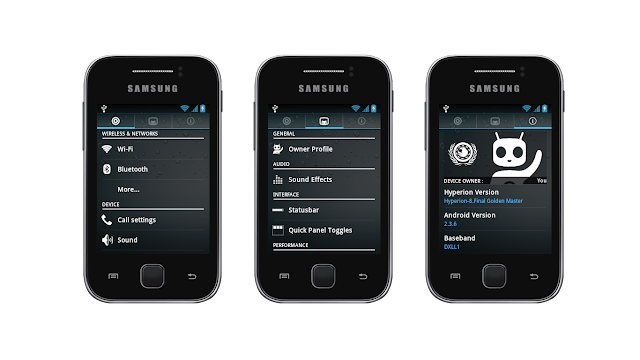



RIL Fix - Click here.
Source: Hyperion 8 official xda thread
Unfortunately for the fans, this seems to be the last and final build of the Hyperion 8 Golden Master but ther appears to be an incoming update to the rom soon, so stay tuned.
P.S. For those of you who might be wondering where the AOSP lockscreens are, or whether there is an extended power menu or not. The answer is, they are not included simply because the developer(s) find them useless to have on the rom.
Features:
- Rooted
- BusyBox
- Deodexed
- Zipaligned
- init.d support
- Quick Panel toggles
- Statusbar brightness slider
- Swipe to remove notifications
- EDT Tweaks
- Owner profile
- Mega Bass Beats Audio mod
- Bravia Engine
- SoundAlive mod
- XLoud loudness equalization
- Beats Audio
- and many more
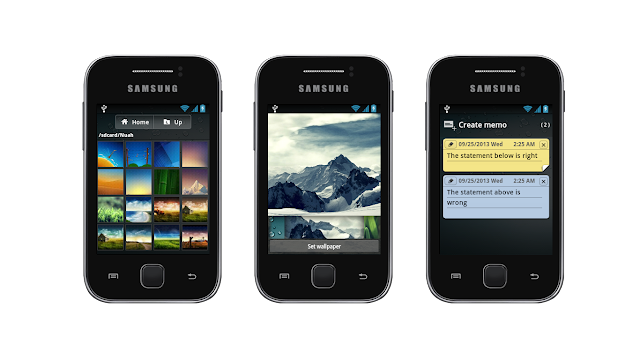
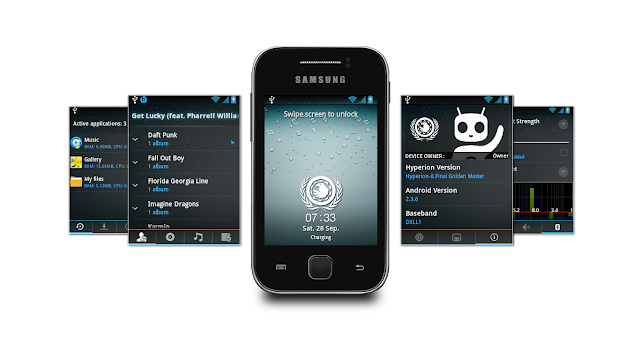
ROM Screenshots:


Downloads:
Hyperion 8 ROM - Click here.RIL Fix - Click here.
Installation:
- Download the two zip files to your sdcard
- Boot into CWM Recovery
- Go to mounts and storage - make sure everything is mounted
- Go back, head into advanced and wipe dalvik cache, then wipe battery stats (optional)
- Go back, wipe data/cache
- Choose to install zip from sdcard
- Locate the Hyperion 8 zip file and choose it, choose Yes to confirm
- Once the rom is installed, again choose zip from sdcard and this time flash the RIL Fix zip file
- Once flashed, go back and choose reboot system now
Installation & Quick Preview:
Source: Hyperion 8 official xda thread
The long awaited GYA rom is here! I have only released this rom just because of a lot of demands. Everyone found it good looking from the videos and I thought I'd share it.

Please keep in mind that this rom was made for my personal use in the first place, so it's pretty obvious why it will be missing all of those useless extras mentioned above.


Download ROM (Dev-Host) - Click here.
Once again I would like to remind you that this rom was never meant to be released to the public, thus it lacks most of the features roms nowadays have. If you would like to see this rom advance in features and get most issues fixed, please leave a comment or drop an e-mail at: galaxyyarchive@abv.bg

What is the concept?
The concept of this rom is to bring you a totally different feeling when you flash the rom. The goal is to give the user after flashing the rom, a feeling of using a totally different phone with a more advanced TouchWiz look. This rom does not have all of those cool EDT Tweaks, customizable notification screen features and so on, because I am trying to keep the simple Samsung TouchWiz stock look. Still, there are some goodies that can come of most use, so instead of filling up the rom with useless crap I have only added the most needed and primary features such as the lidroid toggles, the custom lockscreens, Viper4Android FX to enhance your audio, and a few more.Please keep in mind that this rom was made for my personal use in the first place, so it's pretty obvious why it will be missing all of those useless extras mentioned above.
NOTE:
This is an experimental release, meaning that I didn't take any effort at all to test and improve things. This rom will come with Superuser app but without root binaries, so you would need to manually root it just like how you first root your phone. The boot animation also got damaged unexplainably therefore I have temporary disabled it with 1 line of code in build.prop. If you feel like you can fix it, remove the line "debug.sf.nobootanimation=1".Features:
- BusyBox
- Deodexed
- Lidroid Toggles themed in Samsung's TouchWiz look
- 6 AOSP Lockscreens
- Viper4Android FX to enhance your music experience
- Well organized Settings
- Power Saver app (included in Settings)
- Advanced TouchWiz themed
- TouchWiz4 launcher look-a-like with replaceable/movable dock icons
- Latest Google Play
- Some app icons taken off Ace 2, S2, etc
- Kernel free
- Some performance tweaks have been added
- Custom GYA boot animation and sound (temporary stopped from build.prop due to problems)
Changes applied in v1.1:
- Fixed boot animation
- ROM now comes rooted, should not have any issues with obtaining root access
- Fixed WiFi "Obtaining IP address" issue
- Zipaligned APKs to decrease RAM usage
- Some bloatware removed
- Default wallpapers changed
- Calling should work without any issues and IMEI should be detected
Screenshots:
Download ROM (Dev-Host) - Click here.
Installation:
- Download the zip to your sdcard
- Boot into CWM Recovery
- Go to mounts and storage -> format /system, format /data
- Mount the partitions if they are not mounted after the formatting
- Go back, choose to install zip
- Install the zip
- If you get an error such as Status 7, ignore it and reboot
Installation video & Quick tour:
Once again I would like to remind you that this rom was never meant to be released to the public, thus it lacks most of the features roms nowadays have. If you would like to see this rom advance in features and get most issues fixed, please leave a comment or drop an e-mail at: galaxyyarchive@abv.bg


Downloads:
Download ROM - PAranoid-totoro 1st BuildWhite 1.3.3 CWM flashable - Click here.
Installation:
- Flash white kernel zip file through CWM
- Mount /system, /data and /cache
- Flash the rom zip file
- Wipe data
- Reboot
- Wait for about 2~3 minutes and the rom will boot
Bugs list by percy_g2:
Main bug list:- No camera
- No audio
- No wifi
- No bluetooth
- Overlay for ldpi (fixed)
- Audio
- Bluetooth
- WiFi
Tips
Some apps in tablet mode are too big to fit our screen like camera and also statusbar so don't change its UI to tablet. you can change dpi of any apps so change it that you find suitableCredits:
- percy_g2
- Deadly
- Shaan
- whitexp
- bieltv.3
- pyschogame
- spacecaker

Description:
A Stock-based ROM Black and White theme, aiming to make a ROM for every Galaxy Y User. In this V2 of our ROM, all the issues, bugs and suggestion from Lenox Evolution V1 are fixed and maded.
Lenox Evolution V2 are gotten better.
Disclaimer:
We and XDA-Developers.com are not liable in the bricking of your phone and the reason why you destroy your phone. Always make a nandroid backup first before flashing(it saves a lot). In case you dont know what to do if you encounter some problem. Dont panic and try to search for a fix.
ROM Features:
Launcher
- Landscape View
- Launcher Settings
- 5 Dock Icons
- About Phone
- Toggles
- Swipeable Layout
- Sliders
- 2 UI Classic and Tiled
- Label (Carrier label maybe but its not a carrier though)
- Shortcuts probably Settings
- Brightness slider at statusbar
- Working Signal, Battery, Clock Tweaks
- Tabs settings
- More Lenox Parts than Lenox Evolution Version 1
- Power Control Widget (Having only 5 widgets is too mainstream)
- Lenox Lock
- iPhone look first tab
- Owner Profile
- Extended Power Menu
- Edited bools.xml
- Edited Date and Time Display
- Stock Drawables Revamped
- Lidroid Lockscreen
- Lockscreen with Gestures
- Revamped Looks
- Music Widget (still have a problem at album though)
- No auto conversion
- Message skin at background
- Revamped Clock/Widger
- Revamped Task Manager
- Revamped Radio
- Revamped Phone.apk
- Revamped Dialer
- Revamped Calculator
- Revamped MyFiles
- Revamped WallpaperChooser
- Added build.prop tweaks
- Init.d Support
- Kernel Free
- Lates GApps
- Bravia and XLoud Tweaks
- Added Root and Busybox Run-Parts
- Bootanimation(totally addicted to it)
- FastBooting
- More Battery Juice
If you have any questions, suggestions, or whatever you want, You can contact or talk with this guys on XDA!
- PineappleOwl@xda
- ryan_joshua@xda
- tentenponce@xda
- jpdesuasido@xda
- ichoridjr@xda
- mavskate@xda
- zionear@xda

Download Link: Click here!
Mirror Link: Dev-Host
Note:
The Official XDA Thread is in "XDA DevDB" Project in which you can see new features like looking the Screenshots, Reviews, Discussions, Downloads and Feature Requests. You can support the ROM by adding a great review. Submit bug reports if you found it! Also for downloading the ROM in the XDA DevDB Downloads you can support our ROM. Rate the thread 5 stars because that's the only thing you can pay for us ^_^. Have a great day guys.
Installation & Review:
Official XDA DevDB Thread
http://forum.xda-developers.com/showthread.php?t=2462914
Features:
- Based on CM7 by Percy Gahlot
- System thoroughly edited
- Improved battery performance
- Jelly Bean 4.2 Status Bar style
- ICS/Jellybean like Task Switcher
- Jellybean style settings with categories
- Changes in various applications and framework to maximize appearance JB
- Animations JellyBean
- Status Bar Brightness Control
- All Wallpapers Nexus4 included
- Gapps included
- Full odex
- ZipAligned For Faster Performance
- Improves gaming experience
- High performance 2D and 3D
- Much more space for new apps (see screenshot)
- Latest Fly-On Mod!
- Now available on Galaxy Fit
Screenshots:

Download ROM - Click here.
Download Kernel (required) - Click here.
Installation:
- Download the two zip files to your sdcard
- Power off your phone, boot into CWM Recovery
- Go to mounts and storage, make sure everything is mounted
- Go back, choose to install zip from sdcard and choose the Percy_G2_CyanogenMod2_2.zip file
- After it is done installing, go back, go to "advanced" and choose "Reboot recovery" option
- Your phone will reboot into the new Recovery mode from the kernel you flashed
- Head again into mounts and storage and format /system, /data and /cache
- After formatting them, mount them all
- Go back, and now select to install zip from sdcard
- Choose the rom zip file, choose Yes to confirm
- After installation is complete, choose "reboot system now"
Installation & Review video:
For support and troubleshooting bugs, you may visit the official xda forum thread: link

It consists of lots of graphical changes aswell as core changes. A very glowy and interesting look.
The icons seem to be like a mixture between Nokia and MIUI, the status bar of a stock ICS/JB and other goodies such as tweaks for less battery and memory usage, 7 lockscreens, and many more.
Features:
- Alfa Tweaks - Less battery usage and less memory (RAM) usage
- Beats Audio
- ZRam
- White Kernel 1.3.3
- Extended Power Menu (EPM)
- GPS Tweaks
- Firewall
- ADW Launcher
- 7 Lockscreens
- 5 frequencies
- Alfa Parts
- Blue Lockscreens
- 14 Toogles on Status Bar
- Swipe to Remove Notifications
Screenshots:


Download ROM - Click here.
Instructions:
- Boot to recovery mode
- Flash CWM Recovery
- Wipe data and cache
- Choose install zip from sdcard, then choose the zip, confirm with Yes when asked
- Reboot
- Enjoy


