Install this only if you have the ICB Apocalypse ROM installed. Link: here.
Velocity Tweaks
What Does It Do?
Actually, This Update Is A Script That Optimizes Your Phone! But Make Sure You Have This Rom Installed.
Some Of It's Features Are:
- Automatic Zipalign On Startup
- Ram Optimizes On Startup
- Automatic Gaming And Multitasking Switch Enabled
- Automatic Cache And Junk Cleanup
- SqLite Database Optimzer And Defragger
- Sd Card W/R Booster And Fixer
- Network TCP And 3G Tweaks
- Improves Battery Life Through Some Kernel Tweaks
- Some Database And File Fixes
- System Tweaks To Improve Performance
- Some Lag-Free Kernel Tweaks
- Lots Of build.prop Tweaks
More Features You Can Find.... (Just Posted Basic Features )
What Proves That It Really Boosts Up My Phone?
Here are some screenshots:


How do I install this update?
Note: Before Installing This Update Delete The S30system_tweaks,S70sd_speed_fixer,S97ram_optimize , and S98zipalign Files In The Init.d Folder.
Note: Before Installing This Update Delete The S30system_tweaks,S70sd_speed_fixer,S97ram_optimize , and S98zipalign Files In The Init.d Folder.
- Download This Zip
- Copy Or Paste The Zip To Your SD Card
- Reboot To Recovery
- Mount Data And System
- Flash The Zip
- Unmount Data And System
- Reboot
- Done! It Was Easy Right!?
Do this at your own risk! No one will be liable for any damages.
Note: Log Will Be Saved To data/velocity
Original xda post: Click here.
Hi everyone, today I'm going to share with you the Cyanogenmod9 boot animation which I have modded to my needs.
At first I was about to render the After Effects project file into a movie and then split it up into frames and all that until I realised that they actually share downloadable versions of the boot animation.
So basically all I did here was increase the loops on the second part to make it not start over so that it looks the same like in the real Cyanogenmod9 boot.
Here is 1 screen:

Video:
Instructions (For Custom ROMs which are custom bootanimation ready):
1. Transfer the bootanimation.zip file to your SD card.
2. Use any Root Browser app and copy the bootanimation.zip and then go to directory /system/media and replace your old one with this one.
3. Reboot and you're done.
Instructions (For Stock ROM users):
1. Follow guide here.
2. After you have done that, transfer the bootanimation.zip file to directory /system/media as mentioned above.
4. Reboot and enjoy.
Download: Click here.
Thanks to http://cyanogenmod.com for the animation.
I posted this on xda aswell, so do not tell me I copied.
At first I was about to render the After Effects project file into a movie and then split it up into frames and all that until I realised that they actually share downloadable versions of the boot animation.
So basically all I did here was increase the loops on the second part to make it not start over so that it looks the same like in the real Cyanogenmod9 boot.
Here is 1 screen:

Video:
Instructions (For Custom ROMs which are custom bootanimation ready):
1. Transfer the bootanimation.zip file to your SD card.
2. Use any Root Browser app and copy the bootanimation.zip and then go to directory /system/media and replace your old one with this one.
3. Reboot and you're done.
Instructions (For Stock ROM users):
1. Follow guide here.
2. After you have done that, transfer the bootanimation.zip file to directory /system/media as mentioned above.
4. Reboot and enjoy.
Download: Click here.
Thanks to http://cyanogenmod.com for the animation.
I posted this on xda aswell, so do not tell me I copied.

Hi everyone, today I'm going to show you how to make your Galaxy Y use custom boot animations on a stock ROM. Now most (if not all) custom ROMs have this enabled. However, stock ROMs cannot display your custom bootanimation just like that.
Requirements:
ROM Toolbox or any other Root Browser app
Boot Files.zip - Click to download
Part 1:
Instructions:
1. After you have downloaded the Boot Files.zip file, extract it using WinRAR or 7zip
2. Transfer the 2 extracted files to your SD card wherever you want.
3. Start your Root Browser app and go to your SD card directory, select the 2 files and select either Copy or Move.
4. Go to the directory /system/bin and paste the 2 files in there.
5. Enjoy
Part 2:
Installing the custom Boot Animation:
1. Choose any custom boot animation you like (The file should be called bootanimation.zip)
2. As mentioned above, you need a Root Browser app again, so transfer the bootanimation.zip somewhere to your SD card and start your Root Browser app
3.Incase the file system is r/o permission, tap the Mount r/w button if needed. In ROM Toolbox you don't need to.
4. Copy the bootanimation.zip file to /system/media
5. Reboot and enjoy.
I will not be liable for any damage you cause to your phone (bootloops, etc) do this at your own risk!
Ice Cream Bread - Apocalypse v4.5
A Fast, Stable, Speedy, Lagfree, Customizable Rom
A Fast, Stable, Speedy, Lagfree, Customizable Rom
Based On Pure Stock DXLC1 Firmware
System Features:
System Features:
- Pre-Rooted/SuperUser
- Busybox v1.19.3 Installed
- Darktremor Apps2SD v.2.7 Installed
- Zipaligned
- Deodexed
- Init.d Support (Apoc Kernel)
- Bash Command Shell
- Nano Support
- Undervolt Support (-110mV Default)
- CWM v5 Recovery As Default
- Dualboot Support
- Droid Wall Support
- CIFS Support
- Swap Support
- Bacem Tweak Integrated (110mV As Default)
- 4 Frequencis ( 312, 468, 624, 832 )
- ext4 Support
- sd-Ext Integrated
- cm7 Support
Display Features:
- Gingerbread 14 Status Toggle (Transparent)
- I.C.S - Honeycomb Popups
- Bounce Animations
- Froyo-Honeycomb Lockscreen
- Sony Xperia Launcher
- I.C.S Nexus Bootanimation
- Some ICS,Froyo, and Gingerbread Wallpapers
- Sony Bravia HD Engine
- MiFile Explorer (Black ICS Themed)
- 2 Pre-Installed Fonts (Chococooky And ComicBookC)
- Froyo Messaging
- Gingerbread Dialer
Performance Features:
- Init.d Performance Scripts
- Lag-Free System
- Ram Optimization Tweaks
- Build.prop Tweaks
- 18 Governors Added (Apoc Kernel), 5 IO Sched
- conservative
- smoothass
- smartassV2
- hotplug
- minmax
- Scary
- SavagedZen
- lazy
- interactiveX
- brazillianwax
- interactive
- ondemand
- powersave
- bcm21553
- Lionheart
- performance
AND Some More Governors...
Network Features:
Network Features:
- *LA1/*LC1 CSC (Set As GLB Default CSC)
- Network TCP Tweaks
Other Features:
- Google Maps W/ Worldwide Navigation Activated
- Google Play Music 4
- Beats Audio Images (bass_iBeats,dynamic_iBeats) Compatible For Beats Solo
- DSP Manager 2.3.6/2.3.6
Screenshots:


Download: Click here.
02.08.2012 - Update: Click here.
Installation:
- Download the .zip file from the download link.
- Move or copy the .zip file to your phone
- Boot up to Recovery Mode (VolUp+HomeKey+PowerKey)
- Wipe Data And Cache
- Select "Apply Update From Zip"
- Choose the zip file
- After installation select "Reboot System Now"
- When boot up Completes you have successfully installed the rom!
Description:
VLC is a free and open source cross-platform multimedia player that plays most multimedia files as well as discs, devices, and network streaming protocols.This is a BETA version of the port to the Android™ platform. It is intended for power users and hackers. This version is NOT stable and is slower than the final version.
It might kill your kitten, destroy your house and start the mayan apocalypse.
Use it at your own risk. Have Fun! :)
NOTA BENE
–––––––––––
This version is ONLY for devices with a CPU ARMv7 that will support NEON. Other devices will be supported by other applications, very soon.
Features
––––––––––
VLC for Android™ plays most local video and audio files, as well as network streams, like the desktop version of VLC.
VLC for Android has a media library for audio and video files, and allows to browse folders directly.
VLC has support for multi-track audio and subtitles. It supports auto-rotation, aspect-ratio adjustements and gestures to control volume.
It also includes a widget for audio control, supports audio headsets control, covert art and a complete audio media library.
Missing Features
––––––––––––––––––
As this is an early BETA version, a lot of things are not finished, but will change for the final release:
• The basic User Interface will change;
• Performance improvements are missing;
• Some audio issues might occur;
• Hardware decoding works only with a limited set of hardware;
• Other unknown issues.
Permissions
–––––––––––––
• It needs hardware control, in order to change the audio volume;
• It needs phone calls control, in order to pause the music when someone is calling;
• It needs full Internet access to open network streams;
• It needs to be able to read logs, during the beta version, to understand the issues;
• It needs to get access to the SD card storage, in order to allow deletion of files.
Screenshots:
Video:
Download from Google Play: Click here. (Impossible)
or
Download apk: Click here.
Developer: VLC Mobile Team
This was not ported by me, thanks to xmixahlx from xda developers
It might kill your kitten, destroy your house and start the mayan apocalypse.
Use it at your own risk. Have Fun! :)
NOTA BENE
–––––––––––
This version is ONLY for devices with a CPU ARMv7 that will support NEON. Other devices will be supported by other applications, very soon.
Features
––––––––––
VLC for Android™ plays most local video and audio files, as well as network streams, like the desktop version of VLC.
VLC for Android has a media library for audio and video files, and allows to browse folders directly.
VLC has support for multi-track audio and subtitles. It supports auto-rotation, aspect-ratio adjustements and gestures to control volume.
It also includes a widget for audio control, supports audio headsets control, covert art and a complete audio media library.
Missing Features
––––––––––––––––––
As this is an early BETA version, a lot of things are not finished, but will change for the final release:
• The basic User Interface will change;
• Performance improvements are missing;
• Some audio issues might occur;
• Hardware decoding works only with a limited set of hardware;
• Other unknown issues.
Permissions
–––––––––––––
• It needs hardware control, in order to change the audio volume;
• It needs phone calls control, in order to pause the music when someone is calling;
• It needs full Internet access to open network streams;
• It needs to be able to read logs, during the beta version, to understand the issues;
• It needs to get access to the SD card storage, in order to allow deletion of files.
Video:
Download from Google Play: Click here. (Impossible)
or
Download apk: Click here.
Developer: VLC Mobile Team
This was not ported by me, thanks to xmixahlx from xda developers
Description:
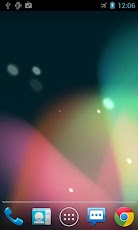
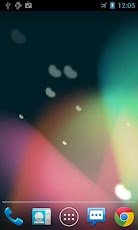
Get new Jelly Bean wallpaper on your devices!Download the free Jelly Bean (JB) live wallpaper featuring floating particles. You can also change different type of particles in settings screen.
To use: Home -> Menu -> Wallpapers -> Live Wallpapers
To develop more free great live wallpapers, we have implemented some ads in settings.
Advertisement can support our develop more free great live wallpapers.
Our wallpaper contains "NO notification or icon ads"!!
This live wallpaper has been tested on latest devices such as Samsung Galaxy S3 and Galaxy Nexus. Please contact us if your device is not supported.
Note: If your wallpaper resets to default after reboot, you will need put the app on phone instead of SD card.
Screenshots:
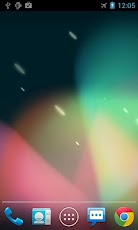
To use: Home -> Menu -> Wallpapers -> Live Wallpapers
To develop more free great live wallpapers, we have implemented some ads in settings.
Advertisement can support our develop more free great live wallpapers.
Our wallpaper contains "NO notification or icon ads"!!
This live wallpaper has been tested on latest devices such as Samsung Galaxy S3 and Galaxy Nexus. Please contact us if your device is not supported.
Note: If your wallpaper resets to default after reboot, you will need put the app on phone instead of SD card.
Screenshots:

Download from Google Play: Click here.
or
Download apk: Click here.
Developer: Wasabi
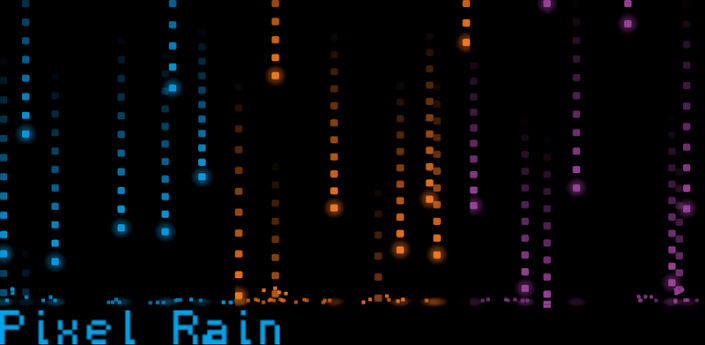
Description
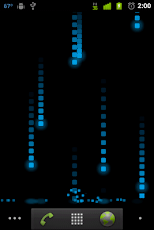
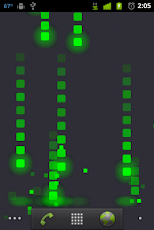
Customizable pixel-styled rain with splash effects!Pixel-styled raindrops fall on your home screen and make splash effects as they collide with the ground.
Pixel Rain is very customizable:
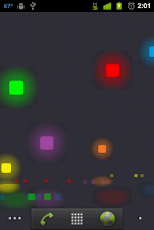
+Multi-color raindrops(Choose up to 10 different custom colors)
+Number of active raindrops
+Size of rain drops(now includes random sizes)
+Falling speed of raindrops
+Length of rain trails
+Optional glow (can choose to show ground and/or rain glows)
+Glow Transparency
+Optional shatter
+Shatter Effect
+Optional alignment
+Depth
+Ground position can be adjusted to change where drops shatter
+Background color or Custom Image
+Optional scrolling with cool trail effect
+Shatter on touch with variable collision circle size
+Hardware Acceleration for compatible Android 3.0+ devices
With touch features enabled you can shatter raindrops by touching them. Use the preview screen and the collision circle to setup your preferred touch radius.
To set as Live Wallpaper:
After installing, long press or press the menu button on the home screen -> Wallpapers -> Live wallpapers -> Pixel Rain
From this preview screen you can change your settings before setting Pixel Rain as your live wallpaper.
Pixel Rain Live Wallpaper ChangeLog: https://docs.google.com/document/pub?id=17iknt9ocl1qfzS0ZHs28EauzuBb4YFi2kAGd5eKiTYk
All released versions of Pixel Rain LWP are available for download in the ChangeLog.
If you've been really enjoying Pixel Rain please support me! Purchase Pixel Suite Live Wallpapers and get rain, snow, and leaf pixel wallpapers! Get Pixel Suite here: https://market.android.com/details?id=gilleland.software.pixelsuite
Screenshots:
Download from Google Play: Click here.
or
Download apk: Click here.
Developer: Shawn Gilleland


