So I've decided to make a little preview video of the JellyBlast v3 ROM since at the moment it is a huge hit and many Galaxy Young users use it.
Please note that in the video I do not explain every single detail about the ROM, stuff such as the tweaks it has, the features, improvements, etc. It's more like a tour video showing you what and how that looks like.
Video:
P.S. You are welcome to request videos by posting in the comment form about whatever you want to see next.

What's New:
Upon closer inspection and analysis, I found a new set of XXHDPI 144x144px icons for tablets with similar to the Nexus 10 high density as well as some changes to the code for recommendations and Play Store widgets, though I couldn't pinpoint the exact differences in those. Visually, the widgets seemed the same. The new icons account for the 120K bump in size compared to 3.9.16.
There could be other minor or under-the-hood changes that I haven't discovered yet. If you do find them, drop us a line in the comments.
Screenshots:


Download apk: Click here.
Install the apk just like you install any normal app. Reboot may be needed.
Extended Power Menu (EPM)
For Hyperion
A great thing which is missing for devs in the Hyperion Rom is EPM. This MoD will add Extended Power Menu to Hyperion. This will enable to quickly go to Recovery mode, etc,
The Extended Power Menus that appear are:
--> Silent Mode
--> Data Network Mode
--> ScreenCapture
--> Power Off
--> Restart
--> Recovery
--> Download
These features prove to be useful instead of Powering Off the device and pressing some buttons...
Screenies:


Download :
EPM for Hyperion -- > HERE
Instructions :
--> Download the file.
--> Go to Recovery Mode (Stock or CWM).
--> Flash the file.
--> Reboot Device.
--> Enjoy!!!
Thanks
 to:
to:CarlDeanCatabay for his Awesome Hyperion Rom.
 Ganesh Arivoli for adding EPM to that.
Official Thread:
http://forum.xda-developers.com/showthread.php?t=1967618
There are 12 wallpapers in this pack. Samples:




Download: Click here.
Also please note that the wallpaper sizes have been shrinked to fit the post. They are actually bigger in the pack which is better.

Introducing Xperia NxT MoD for GingerBREAD. This works in all roms. This MoD features all Xperia items like Mobile Bravia Engine,Icons, etc. which are ported to other GingerBread devices. I did not include Timescape UI as many devices don't support it. But I have included many Xperia items that you would like !!!
Note: This Mod is only for rooted GingerBread devices.
Features:
--> Stock Xperia S icon pack.
--> Xperia Widgets.
--> Xperia S Fonts.
--> Xperia S Launcher.
--> Xperia T Plasma Boot Animation.
--> Mobile Bravia Engine.
--> xLOUD Engine.
--> Beats Audio.
--> Beats.apk instead of DSP Manager.
--> Xperia S Audio Files.
--> Xperia SemcCalender.
--> Xperia ICS themed TrackID.
--> Xperia WallPapers.
--> Xperia S WallpaperPicker.
--> Xperia Live Wallpapers.
Xperia Widgets Included:
--> Clock Widgets.(5 clocks)
--> Digital Clock Widget
--> NxT Digital Clock Widget.
--> Smart Contacts 4x1.
--> Smart Contatcs 4x2.
--> Smart Contacts 4x4.
--> Photos & Videos widget.
--> On Off Tools Widget. (11 widgets)
--> TrackID Widget.
--> Weather Widgets.(2 widgets)
Note: You may not get all widgets. It depends on your Launcher.
Use the provided Xperia Launcher which supports all widgets.
Screenshots:


App Drawer

Home Preferences


Wallpapers


Apps & Widgets


Font (Clock)

Downloads:
--> Xperia S Icons.zip-- HERE
--> Xperia NxT MoD.zip-- HERE
Instructions :
--> Download The Files:
1) Xperia S Icons.zip
2) Xperia NxT MoD.zip
--> Go To CWM Recovery.
--> Flash The Files.
--> Reboot Device.
Note: Reboot Device After You Flash The 1st File And Then Again Go To CWM to Flash the 2nd File.
Credits:
ra3al
CarlDeanCatabay
Emperor.dk
Achotjan
0verdosedbrun0
Chris95X8
Official xda thread: Click here.

Description:
** IM NOT RESPONSABLE OF DAMAGES CAUSED TO YOUR DEVICE DUE TO AN INCORRECT USE OF MY APPLICATION **
Requirements: A Rooted phone, Superuser and Busybox.Tested on:
- LG GW620
- Sony Ericsson Xpheria Neo V
- HTC Desire HD
Tired of using hard-to-remember commands on terminal console to install apps in system partition? Do you want to keep your stock apps updated without waste space? Do you want to delete stock apps and clean your system from useless apps? This is you app!
With System Apps Installer, you'll be able to, easilly, install your favourite apps into the system partition.
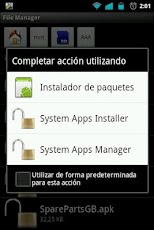
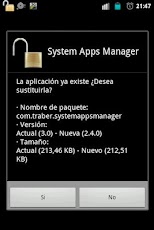
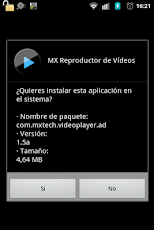
System Apps Installer integrates with system as a package installer, but wich will install apps directly in the system partition. To do it, only browse with your favourite file manager, select your app, and open it with System Apps Installer; the app will do the rest.
* Notice: Not every app installed in system partition works correctly. Is not recomended to install antivirus programs on system partition.
Requirements: A Rooted phone, Superuser and Busybox.Tested on:
- LG GW620
- Sony Ericsson Xpheria Neo V
- HTC Desire HD
Tired of using hard-to-remember commands on terminal console to install apps in system partition? Do you want to keep your stock apps updated without waste space? Do you want to delete stock apps and clean your system from useless apps? This is you app!
With System Apps Installer, you'll be able to, easilly, install your favourite apps into the system partition.
System Apps Installer integrates with system as a package installer, but wich will install apps directly in the system partition. To do it, only browse with your favourite file manager, select your app, and open it with System Apps Installer; the app will do the rest.
* Notice: Not every app installed in system partition works correctly. Is not recomended to install antivirus programs on system partition.
Screenshots: