What's new in v3?
Screenshots:


Download ROM: Click here.
Installation:
Source: http://forum.xda-developers.com/showthread.php?t=2027351
- Very smooth and lightening fastall bugs fixed from v2
- revamped new ui
- All new bootanimation with awesome graphics [credits to yash989] DSP manager
- 6 lockscreens [credits to the dev]
- Added new extended power menu
- Blue themed ui
- Themed stock launcher and added launcher pro [free version]
- Removed all bloatwares
- HD call screen derived from Assassins creed [am a big fan of them]
- SONY CYBERSHOT camera ENHANCEMENTS- Clearer pictures like never before
- All new settings
- Kuro kernel- fast and rock strong
- New dialer and contacts like that from cm7
- Back and menu key vibration
- BRAVIA and TIMESCAPE hack.. [i will provide it as a patch]
- ICS like message by Yash989[ big thanks to him]
- Breath-taking status bar with 14 toggles..
Screenshots:
Download ROM: Click here.
Installation:
- Flash stock rom via odin by going in download mode [vol down+home+power]
- Go to cwm recovery[ vol up+home+power] wipe data+cache
- Select install zip from sdcard
- Select xtreme fusion v3
- Select yes
Source: http://forum.xda-developers.com/showthread.php?t=2027351
Deodexing your stock ROM allows you to fully customize it. For a more indepth explanation of what is the difference between odexed and deodexed, check out this article.
First, let's list the requirements.
First, let's list the requirements.
- Rooted phone
- xUltimate 2.3.3 - Click here to download.
- How to install and configure Android SDK for this guide - Click here for video.
- Commands:
adb shell
su
stop
mount -o rw,remount /system/ /system/
cp /sdcard/done_app/* /system/app/
rm /system/app/*.odex
cp /sdcard/done_frame/* /system/framework/
rm /system/framework/*.odex
mount -o ro,remount /system/ /system/
reboot

Yesterday we got a post made on our Facebook fanpage by Ameya Gokhale taking us to a post on his blog (Click here) explaining how he tried out the app. The app we are talking about is called Vtok, which can be downloaded for free from the Google Play Store. It only support Gtalk. So you need to sign in with your Gmail account in order to use it. If you are afraid it might be a phisher app then don't worry, take a look at it's installation counter- 1,000,000 - 5,000,000
It has been installed from 1 million to 5 million people.
I've also taken the time to test it on the Galaxy Young aswell and as usual we have problems. Don't know if it is just me and my crappy 3G low-speed internet connection, but I constantly get errors such as me being busy and cannot answer or I answer but sound comes with a delay and other problems such as that. But one time I managed to get my camera to show in the conversation, that gives us hope that this does infact work.
You can try it out for yourself:
Play Store - Click here to download.
I would recommend trying it out on a highspeed Wi-Fi connection.

+++ROOT/SU Access REQUIRED +++
This app will install Beats Audio driver to your system. You will hear a big difference on high end phones but even low end devices will profit from this drivers. DSP Manager will likely not work on many devices.
Screenshots:


Note: After you restart the phone there will be some improvements, the phone's sound will be louder, clearer and crispier!!! You also notice a bass enhancement!!! I hope you like that guys! :)
Installation Tutorial Video by GYA:
Password: visit2galaxyyarchive.info
Download from Google play: Click here
or Download APK(Installer): Click here (Latest Current Version 2.3.1)
Developer: motioncoding and XDA-Thread
Features:
Instructions:
Official xda thread: http://forum.xda-developers.com/showthread.php?t=1849039
- CPU FREQ:
- 156
- 312
- 468
- 624
- 832
- NETFILTER (Firewall support)
- Swap support
- CPU Governors: To know about governors click here
- SmartassV2 --> Balanced(name changed to identify easily)
- LAZY --> BattSaver(changed name)
- Wheatley --> Turbodroid
- Interactive
- Performance
- bcm21553(Tweaked)
- ondemand
- conservative(Tweaked)(default)
- I/O Schedulers: To know about I/O click here
- Deadline
- Noop
- V(R)
- SIO(Default)
- INIT.D support (provided by Manoranjan2050 )
More info on init.d click here go below in that post. - Busybox support (provided by Manoranjan2050 )
- Custom Boot logo (Improved quality)
- Ext4 Support. (Ext3 and 2 are supported too)
- NTFS support
- BACEM TWEAK included.
- Battery life improved..
- Performance tweaked..
- A2SD Supported
Instructions:
- Copy these files inside SDCard.. CompactV1.2.5.zip (kernel), CWM-6102.zip (ClockWorkMod Recovery tool) - Click here to download it.
- Note: Don't keep these files inside any "FOLDERS".. Just copy it to SDCard root (parent) folder..
- Switch off your mobile.
After a small vibration (switch off confirmation) PRESS and HOLD 3 BUTTONS (VOLUME UP+HOME BUTTON+POWER BUTTON) when samsung galaxy logo appears, release the 3 pressed keys.. - After few seconds.. You will see Android system recovery (red text with 4 options lines)..
Select "apply update from sdcard"
Note: (Volume up+down for "scrolling" through options or selection of files, home button for "select" any option.. in CWM only: power button for "back" option)
Then Select "CWM-6102.zip". - ClockworkMod Recovery v5.0.2.6 is loaded now.
- Select "install zip from sdcard"
- Select "choose zip from sdcard"
- Scroll and Select "CompactV1.2.5.zip" and select "Yes"
- Wait till the menu appears again..
- Select "Reboot system now" and you have successfully installed Compact kernel.
- Brightness bug on 156 frequency.
- You can try Avast! for firewall feature.
- No-frills CPU Control for setting the above features like Freq, governors, I/O schedulers..
- CPU SPY for checking CPU frequency states usage.
- Quick System Info PRO for checking whether they are working and what all are included features.
- All 4 apps for free and available at google's play store.. Or You can try any other apps of your choice like Set CPU, CPU Tuner etc.
- Irfanbagus for bug fix of source code and BACEM TWEAK..
- Kurotsugi for providing guidance and source of his kernel.
- Manoranjan2050 for ALL the help with bug fixes, guidance and source code fix!!
- Maroc-OS for providing tips and help and info for development and ramdisk..
- Millan.SIS for providing valuable CWM and flash tool.
- Savie for providing tips and info.
Official xda thread: http://forum.xda-developers.com/showthread.php?t=1849039
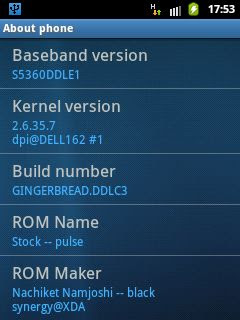
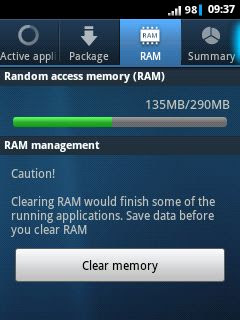
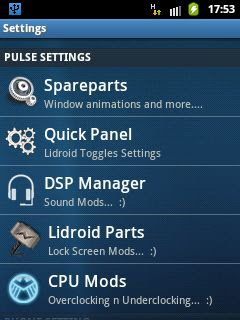
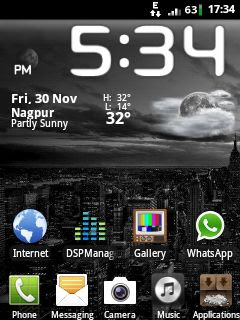
PULSE ROM
FEATURES:
Download: zzzzPulse_basecreator.zip
and
zzzzPulse ROM V1_0.zip
Installation:
FEATURES:
- ***INIT.D SUPPORT***
- 30+ SCRIPTS
- LOOPY SMOOTHNESS
"LOADS" OF build.prop TWEAKS - LIDROID TOGGLE STATUS BAR
- LOCKSCREENS
- BRAVIA ENGINE
- BEATS AUDIO
- ZIPALIGNED
- And much more!
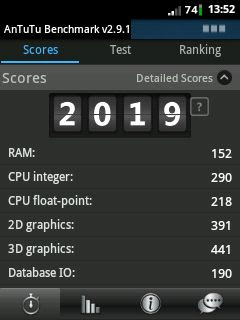
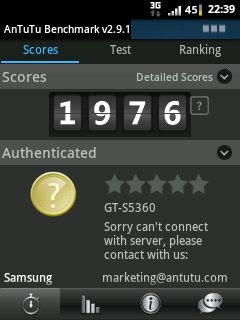
Antutu points:

Download: zzzzPulse_basecreator.zip
and
zzzzPulse ROM V1_0.zip
Installation:
- Put the downloaded files on your SD card.
- Boot into Recovery mode, CWM preffered - Click here to download CWM.
- Wipe data and cache.
- Go to "Advanced" and wipe Dalvik cache.
- Select "install zip from sd card".
- Select "choose zip from sd card".
- Then select "zzzzPulse_basecreator.zip".
- Reboot.
- After the phone reboots, go back to CWM recovery.
- Select "install zip from sd card".
- Select "choose zip from sd card".
- Then select "zzzzPulse ROM v1_0.zip".
- Reboot.
- Explodeaamir - For guidance (a lil bit)
- Hell_lock (for ICS settings and stuff... "cygwin")
- Pratyush.Creed (for 6 lock screens)
- Lidroid (for 14 toggle statusbar)
- Black Synergy (for brain and ideas)
Flashable Icon packs for Hyperion 7/7.X
MI-1

LINK: CLICK HERE
MI-2

LINK: CLICK HERE
MI-3

LINK: CLICK HERE
MI-4

MI-5

MI-6

MI-7

MI-8

MI-9

MI-10

MI-11

LINK: CLICK HERE
MI-12

LINK: https://www.dropbox.com/s/ph2tyh2ht90zuq4/H7XMI12.zip
MI-13

LINK: CLICK HERE
MI-14

MI-15

LINK: CLICK HERE
MI-16

LINK: CLICK HERE
Howto:
Just Flash it via CWM Recovery and Mount/System and Choose the Zip file.
Then Reboot.
 More icon packs soon..


